
TryHackMe - Fixit Walkthrough
Author: Mario Martinez Jr. (ku5e / Gary7) | TryHackMe USA Top 1%
Difficulty: Easy/Medium
Topics: Data Visualization, SPL (Search Processing Language), Operational Intelligence
Answers are redacted within the narrative to allow you to complete the tasks on your own, but a full table of answers is available at the end of this walkthrough.
In this challenge, we act as a Splunk administrator tasked with repairing a broken data pipeline. The core issue involves a custom application that ingests logs incorrectly. Specifically, multi-line events are being fragmented, which ruins data integrity and makes analysis impossible. The fix requires navigating the backend filesystem and correcting the parsing rules that tell Splunk where each multi-line event begins.
Task 1: Locating the Application and Inputs
To begin troubleshooting, we must move away from the Splunk Web UI and into the Linux terminal. Splunk stores its application configurations in a specific directory hierarchy.
The Challenge
We need to find where the "Fixit" app lives and how it gathers data. By inspecting the inputs.conf file, we can see the source of the incoming logs.
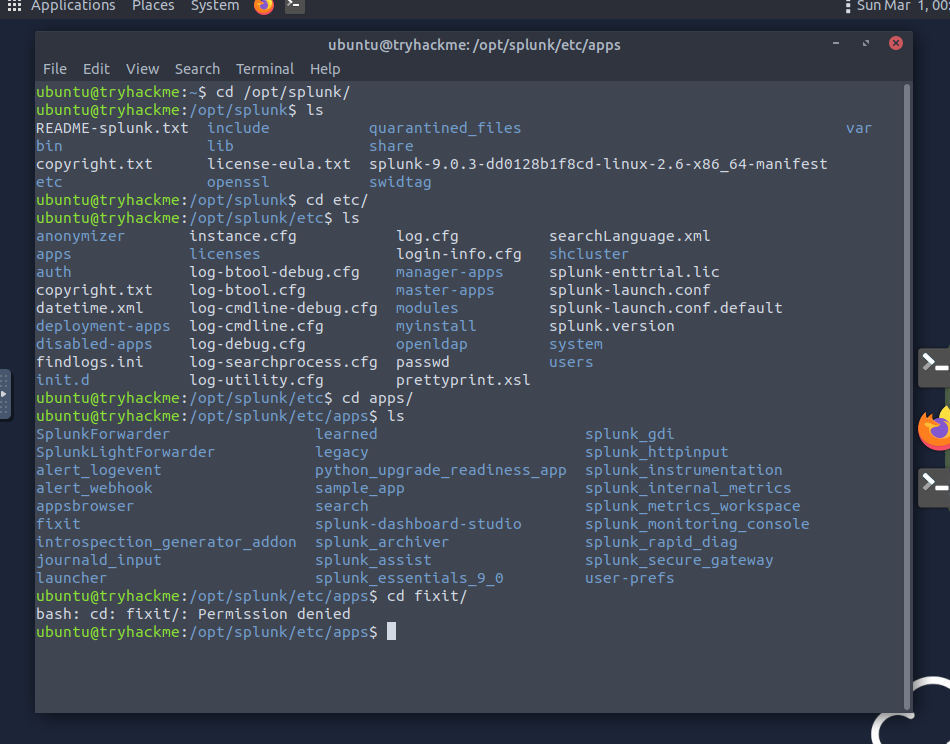
- What is the full path of the FIXIT app directory? You find this by looking in the standard Splunk apps directory. On this instance, navigate to the folder where third-party apps are stored. ANSWER: [REDACTED]
- In the inputs.conf, what is the full path of the network-logs script? Once you are inside the Fixit app folder, navigate to the
defaultdirectory. Read theinputs.conffile to find the[script://...]stanza. ANSWER: [REDACTED]
Task 2: Fixing the Event Boundaries
The logs appear broken in Splunk because the system sees every newline as a new event. Since our logs are multi-line, we need to tell Splunk exactly where a single record starts.
Technical Detail: Props and Line Breaking
We use props.conf to define how data should be structured. To fix multi-line issues, we use a specific stanza that instructs Splunk to look for a pattern before breaking the event. This prevents one log entry from being split into separate, meaningless events.
- What Stanza will we use to define Event Boundary in this multi-line Event case? This setting tells Splunk to only create a new event when it matches a specific regular expression. ANSWER: [REDACTED]
- What regex pattern will help us define the Event's start? Look at the raw data in the script output. Every new entry begins with
[Network-log]:. You must escape the special characters to ensure Splunk reads the brackets literally, but for this specific answer, the room usually looks for the bracketed header itself. ANSWER: [REDACTED] - Which configuration files were used to fix our problem? [Alphabetic order] This task requires modifying a series of files to define the intake, the parsing rules, and the field extractions. ANSWER: [REDACTED]
Task 3: Data Analysis and Statistics
Now that the events are properly parsed and the "Fixit" app is working, we can run Splunk queries to extract the actual statistics.
The Challenge
We need to count unique values for usernames, countries, and IPs. This requires using the stats command with dc (distinct count).
- What is the captured domain? Search for the logs and look for the domain name being accessed in the resource field. ANSWER: [REDACTED]
- How many usernames and source IPs are captured? Run a query like
index=main | stats dc(Username), dc(Source_IP). Ensure you are searching over "All Time" to get the full count. Note that some parsing errors might cause slight variations in count if the regex is not perfect. ANSWERS: [REDACTED] - What are the TOP two countries the user Robert tried to access the domain from? Filter your search for
Username="Robert Wilson"and use thetopcommand on the country field. ANSWER: [REDACTED] - Which user accessed the secret-document.pdf on the website? Search for the literal string of the PDF file name to find the event associated with it. This username might be one that Splunk initially struggled to capture. ANSWER: [REDACTED]
Flag Summary
| Question | Flag/Answer |
|---|---|
| Full path of FIXIT app directory | /opt/splunk/etc/apps/fixit |
| Stanza for Event Boundary | BREAK_ONLY_BEFORE |
| Full path of the network-logs script | /opt/splunk/etc/apps/fixit/bin/network-logs |
| Regex pattern for Event start | \[Network-log\] |
| Captured domain | Cybertees.THM |
| Countries captured | 12 |
| Departments captured | 6 |
| Usernames captured | 28 |
| Source IPs captured | 52 |
| Config files used (Alphabetic) | fields.conf, props.conf, transforms.conf |
| Top 2 countries for Robert | Canada, United States |
| User who accessed secret-document.pdf | Sarah Hall |
Walkthrough by Mario Martinez Jr. (ku5e / Gary7) | TryHackMe Profile | blog.ku5e.com